We’ve all been there: a user gets slightly fatigued by your email frequency, scrolls to the bottom of your latest newsletter, and clicks “Unsubscribe.” In a standard Salesforce Marketing Cloud (SFMC) setup, that single click can trigger a global opt-out, immediately severing your primary line of communication with that prospect or customer.
This all-or-nothing approach to subscriber management is one of the biggest leaks in modern CRM strategy. The solution is taking control of the opt-out experience by building a Custom Preference Center.
The Problem with the Default Unsubscribe
When you rely on the out-of-the-box unsubscribe functionality, you are forcing your audience into an ultimatum: receive everything, or receive nothing. Most users don’t actually want to cut ties with your brand completely; they usually just want less email, or they only want emails about specific topics (e.g., product updates instead of daily marketing blasts).
How a Custom Preference Center Saves Your List
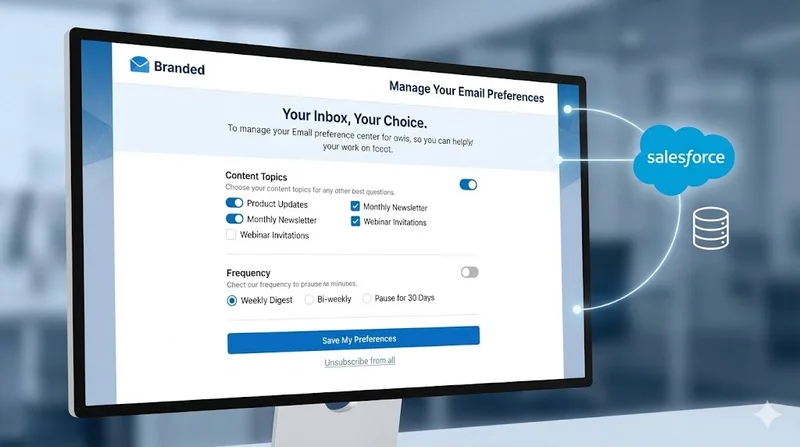
A Custom Preference Center changes the conversation from “Goodbye” to “How can we serve you better?” Instead of a generic opt-out page, the user lands on a branded dashboard that offers them choices.
- Frequency Opt-Downs: Allow users to choose between receiving emails twice a week, once a week, or once a month.
- Content Preferences: Let users check or uncheck the types of content they care about (e.g., Newsletters, Webinars, Promotions).
- The “Pause” Button: Give users the ability to pause communications for 30, 60, or 90 days. This is incredibly effective during busy seasons or holidays.
The Technical Foundation in SFMC
Building a robust preference center requires moving beyond standard drag-and-drop tools. Our technical CRM experts build these architectures using a combination of SFMC’s advanced features:
- Cloud Pages: We design a secure, branded landing page hosted directly within SFMC.
- AMPscript & SSJS: We use custom AMPscript and Server-Side JavaScript to dynamically pull the subscriber’s current preferences from your Data Extensions as soon as the page loads. This ensures the checkboxes accurately reflect their current status.
- Data Architecture: When the user hits “Update Preferences,” our custom scripts instantly write those changes back to a Master Data Extension.
- Sales Cloud Integration: If your SFMC is connected to Sales Cloud via Marketing Cloud Connect, we ensure those preference updates sync back to the core Contact/Lead record, keeping your sales reps completely informed.
Stop the Leak Today
Every day you wait to implement a Custom Preference Center is a day you lose subscribers who might have stayed if you just gave them a choice. While it requires custom coding and a solid understanding of data architecture, the long-term ROI of retaining a healthy, engaged subscriber base is massive.
If you’re ready to upgrade your subscriber experience, our team of certified experts is ready to help you map the data, write the AMPscript, and launch a preference center that protects your audience.