

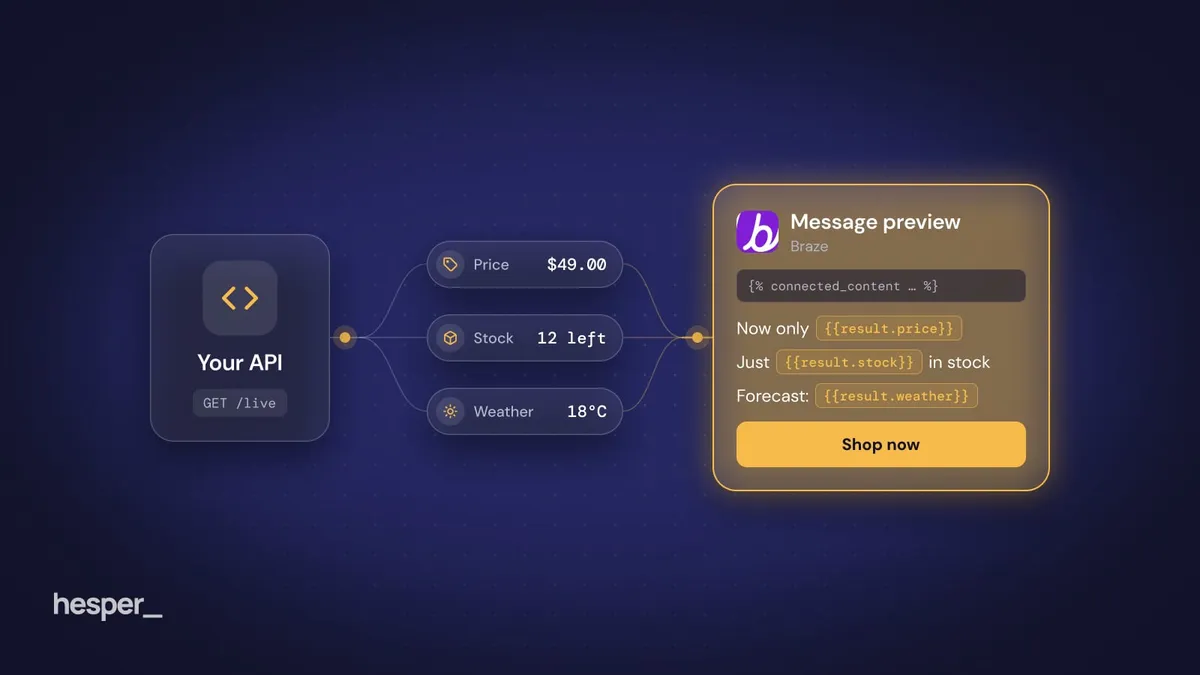
Most Braze personalization uses data already stored on the user profile: a first name, a city, a last purchase. That works until the data changes faster than you can sync it. A price that dropped this morning, a stock level, a loyalty balance or tomorrow’s weather don’t belong on a profile. They belong in the system that owns them.
Connected Content is Braze’s answer. It lets a message call your API at the moment of send and put the response into the message. Used well, it makes messages feel live. Used carelessly, it slows sends, overloads your servers or delivers messages with blank spaces where the price should be.
This guide covers how Connected Content works, the settings that control speed and reliability, and how we test it before launch.
What Connected Content is
Connected Content is a Liquid tag, {% connected_content %}, that you place in a message. When Braze renders the message for a recipient, it calls the URL in the tag. If the response is JSON, you can save it to a variable and use its fields anywhere in the message. If the response is plain text, it’s inserted directly where the tag sits.
You can use it in most Braze message types, and it runs at send time. That second point is what makes it powerful, and it’s also why everything else in this article matters: your API becomes part of the send.
Liquid syntax basics
Here is a message that fetches a live price, stock level and forecast for each recipient:
{% connected_content https://api.example.com/live?sku={{custom_attribute.${last_viewed_sku}}}&city={{${city}}} :save result %}
{% if result == blank %}
  {% abort_message('Live data unavailable') %}
{% endif %}
Now only {{result.price}}. Just {{result.stock}} in stock.
Forecast: {{result.weather}}
A few things to know:
:save resultstores the parsed JSON in a variable calledresult. Without:save, Braze stores JSON responses in a variable calledconnected. We always name it explicitly, so templates are easier to read.- Dot notation reaches into the response:
{{result.price}}, or{{result.items[0].name}}for arrays. - Liquid works inside the URL, so you can pass user attributes, such as a SKU or a city, as query parameters.
- Other options go in the same tag:
:method post,:headers,:bodyand:content_typefor POST requests, plus the caching, retry and authentication options covered below.
Plan for failure with abort_message and :retry
Your API will fail sometimes. What matters is what the message does when it does.
By default, a failed call doesn’t stop the send. A 404, a redirect (Braze doesn’t follow them), or an error without :retry renders as an empty string and leaves the saved variable unset. The message goes out with a blank where the data should be. A “Now only .” email is worse than no email.
You have two tools:
abort_messagestops the send for that recipient when a condition you define is true. The example above aborts whenresultis blank. You can also abort on content, for example whenresult.stockis 0, so nobody is invited to buy something that’s sold out. The reason string must be static text without Liquid. Aborted sends appear in Messaging Observability with the outcome “Liquid abort”.:retrytells Braze to retry the call, up to five times, for most errors:5xxresponses, timeouts and other4xxresponses except404. If every retry fails, Braze aborts the message.:retryisn’t available for in-app messages or Banners.
Use them together carefully. If your abort logic and retry logic target the same condition, abort takes precedence and no retry happens. We use :retry to handle transient errors, and abort_message to check that the data makes sense.
Caching with :cache_max_age
Without caching, every recipient means a call to your API. Caching is the main tool for keeping sends fast and your servers calm.
How Braze caches Connected Content:
- GET requests are cached by default for up to five minutes.
:cache_max_agesets a longer duration in seconds, from a minimum of five minutes to a maximum of four hours. For example,:cache_max_age 900caches for 15 minutes.- POST requests aren’t cached unless you add
:cache_max_age. :no_cacheturns caching off. Expect higher sending latency, and make sure your endpoint can take a request per message.- The cache key is the workspace, request URL, content type and request body. It isn’t tied to a user or a campaign, so identical requests share a cached response across your workspace.
That last point is the design lever. A URL that includes a user ID, Braze ID or email is unique per recipient, so caching can’t help, and Braze may skip it. A URL keyed on a product SKU or a city is shared by many recipients and caches well. When we design an endpoint for Connected Content, we push as much as possible into low-variety parameters and keep per-user lookups for data that genuinely differs per user.
Two caveats from Braze’s documentation: cache durations aren’t guaranteed (the cache can evict entries early), and responses over 1 MB aren’t cached at all. Match :cache_max_age to how fresh the data really needs to be. A weather forecast can be an hour old. A flash-sale stock count probably can’t.
Timeouts, rate limits and send-time performance
Braze expects your server to respond in under two seconds. If it takes longer, the content isn’t inserted, and the timeout counts as a failure (status 599) that :retry can retry. Responses are limited to 1 MB.
Braze doesn’t rate-limit Connected Content separately. Requests follow the delivery speed of the campaign or Canvas, and a message can render more than once per recipient. Plan for more API calls than recipients, not fewer. Braze also protects unhealthy hosts: if calls to a host fail at a high rate, Braze pauses requests to it for a short period.
What this means in practice:
- Size your endpoint for your biggest send. Braze’s guidance is that your server should be able to handle thousands of concurrent connections.
- Set a rate limit on large campaigns if your API can’t absorb the full send speed.
- Return only the fields the message uses. Small responses are faster and stay well under the size limit.
- Put a cache or CDN in front of the API, so Braze’s caching isn’t your only protection.
Security: credentials, not secrets in templates
Never paste API keys or passwords into a Connected Content tag. Anyone with access to the template can read them, and they end up copied into every message that reuses the code.
Braze stores credentials under Settings > Credential Management. You then reference them by name:
:basic_auth credential_namefor basic authentication.:auth_credentials credential_namefor token authentication. Token credentials require an allowed domain, and work only with that domain and its subdomains.
Saved passwords and tokens aren’t displayed again after saving. If you delete a credential, Connected Content calls that still reference it are aborted, so audit templates before removing one.
On your side, use HTTPS and give Braze a key that can only read what messages need. If your firewall restricts traffic, Braze publishes the IP ranges it sends from for each instance, so you can allowlist them.
Practical use cases
- Live price and stock in browse and cart abandonment messages, with an abort when the item is sold out.
- Loyalty balances and tier status from your loyalty platform, always current at send time.
- Weather-based content, such as a rain jacket when the forecast turns wet in the recipient’s city.
- Recommendations from your own recommendation service, keyed on the user’s last viewed product.
- Content from a CMS, such as the latest article or this week’s menu, shared by every recipient and cached for hours.
Connected Content isn’t always the right tool. For product data that changes a few times a day, Braze Catalogs, which store your data inside Braze, can be simpler and put no load on your servers at send time. A common pattern is to combine the two: catalog data for product details, Connected Content for the few values that must be live.
A testing checklist
Before a Connected Content message goes live, we check:
- The Connected Content Debugger. In Preview & Test, Braze lists each call with its rendered URL, method, status code, response body and whether it came from cache.
- Edge cases. Preview users with a missing SKU, a city your API doesn’t know, and an out-of-stock product. Confirm each one either renders correctly or aborts.
- Retries in a real send. Retry logic applies to live and test sends, not previews. Send tests to internal users and confirm the behavior.
- Abort reporting. Check Messaging Observability after the first sends for “Liquid abort” and failed Connected Content outcomes.
- Load. Test your endpoint at the expected send speed, with caching taken into account.
- Credentials. Confirm that no secrets appear in the template, and that each credential’s allowed domain matches the URL.
Getting Connected Content right
Our team builds in Braze every day, and Connected Content with Liquid personalization is a core part of our Braze work. If you want live data in your messages without risking slow or broken sends, get in touch with our team.
Done well, Connected Content makes every message feel current without anyone noticing the work behind it.